Phoenix:
Phoenix is the first part of the binary exploitation learning series by Exploit Education.
Getting Started
You can download the Phoenix challenge files from the official page:
⚠️ At the time of writing, the prebuilt repo wasn’t available. So, I built the VM manually using QEMU — and I’ll show you how to do the same!
For Windows Users
1. Download the Image
- Choose the
amd64version (or whichever matches your architecture). - Format:
.qcow2image inside a.zipfile.
2. Extract & Navigate
unzip phoenix-amd64.zip
cd phoenix-amd64/
3. Install QEMU
QEMU is required to emulate the VM. For best compatibility, run it through WSL (Windows Subsystem for Linux).
Install QEMU (on WSL):
sudo apt update && sudo apt install qemu-system-x86
4. Launch the VM
Run the following from the extracted image directory:
qemu-system-x86_64 \
  -m 512M \
  -kernel ./vmlinuz-4.9.0-8-amd64 \
  -initrd ./initrd.img-4.9.0-8-amd64 \
  -hda ./exploit-education-phoenix-amd64.qcow2 \
  -append "root=/dev/sda1 console=ttyS0" \
  -nographic
Default Credentials
| Username | user |
|---|---|
| Passowrd | user |
Accessing the Challenges
Once logged in:
cd /opt/phoenix/amd64
Replace amd64 with your architecture if you’re using a different one.
You’re In!
If everything worked, your terminal (via WSL) should show a login prompt and boot into the Phoenix VM. From here, you can start working on the binary exploitation challenges.
Pro Tip: Use
tmuxor split terminals to keep debugger sessions, source code, and shell access visible at the same time.
Net-Zero
Challenge: Phoenix/Net-Zero
Goal: Send back a server-generated 32-bit integer in little-endian binary form.
Starting the Challenge
user@phoenix-amd64:/opt/phoenix/amd64$ nc 127.0.0.1 64000
Welcome to phoenix/net-zero, brought to you by https://exploit.education
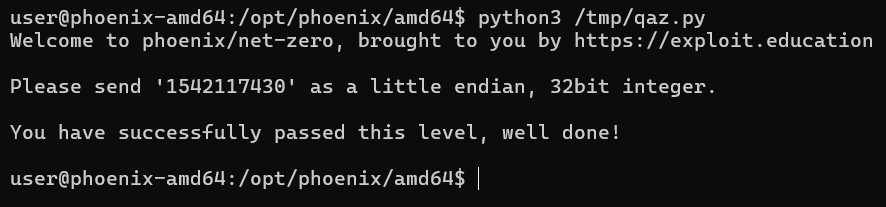
Please send '1575617602' as a little endian, 32bit integer.
hello
Close - you sent 1819043176 instead
The server clearly tells us what it expects, but the important part is how it expects the data — not as ASCII, but as raw binary.
Typing hello sends ASCII bytes, which are then interpreted as a 32-bit integer, resulting in a completely different value.
Source Code Analysis
uint32_t i, j;

getrandom((void *)&i, sizeof(i), 0);
printf("Please send '%u' as a little endian, 32bit integer.\n", i);

read(0, (void *)&j, sizeof(j));

if (i == j) {
    printf("You have successfully passed this level, well done!\n");
}
Key points:
iis a random uint32_t- the value of
iis printed only for our convenience -
input is read using:
read(0, (void *)&j, sizeof(j)) -
this means:
- exactly 4 bytes are read
- those bytes are interpreted directly as a
uint32_t - no string parsing is involved
Network Context
Although a local binary exists, the intended solution is to solve this over the network.
To verify the service:
ss -ltnp | grep 64000
Connection:
nc 127.0.0.1 64000
This confirms we are interacting with a raw TCP service, not a line-based protocol.
Strategy
- Connect to the service
- Read the banner
- Read the line containing the integer
- Extract the number
- Pack it as a little-endian uint32
- Send exactly 4 bytes
- Done
Exploit
import socket
import time
import struct


s = socket.socket(socket.AF_INET, socket.SOCK_STREAM)
s.connect(("127.0.0.1", 64000))


print(s.recv(100).decode())
time.sleep(0.3)
num_msg = s.recv(100).decode()
print(num_msg)


num = int(msg.split("'")[1])
print(num)


bytes = struct.pack("<I", num)
s.sendall(bytes)


response = s.recv(1024)
print(response.decode(errors="ignore"))
Result

Net-One
Challenge: Phoenix/Net-One
Goal: Send back the correct unsigned decimal value of a server-generated 32-bit integer.
Starting the Challenge
user@phoenix-amd64:/opt/phoenix/amd64$ ./net-one
Welcome to phoenix/net-one, brought to you by https://exploit.education
D���okay lol
Close, you sent "okay lol", and we wanted "3637375812"
user@phoenix-amd64:/opt/phoenix/amd64$
At first glance this looks weird: random garbage printed before the prompt. That’s not memory corruption or UB. It’s intentional.
The program is writing raw binary bytes directly to stdout. Terminal is just trying (and failing) to render them as ASCII.
Code Walkthrough
The important part is here:
uint32_t i;

getrandom((void *)&i, sizeof(i), 0);
write(1, &i, sizeof(i));
iis a 32-bit unsigned integer- generated using
getrandom() - written directly using
write() - no formatting, no conversion, just 4 raw bytes
Later, the comparison logic:
sprintf(fub, "%u", i);
if (strcmp(fub, buf) == 0)
This tells us exactly what the program expects:
- convert
i→ unsigned decimal string - compare it against our input
So the task is not exploitation, but correctly parsing a binary protocol.
What’s Actually Going On
-
The server sends:
- a banner (ASCII)
- followed by 4 bytes of binary data
- Those 4 bytes represent a
uint32_tin little-endian -
We must:
- read exactly 4 bytes
- interpret them correctly
- send back the decimal ASCII representation
Trying to treat the received bytes as text or splitting strings will break sooner or later.
Logic
- Connect to the service
- Read and ignore the banner
recv(4)nothing more, nothing lessstruct.unpack("<I", data)- Send back
str(num) + "\\n"
import socket
import time
import struct

s = socket.socket(socket.AF_INET, socket.SOCK_STREAM)
s.connect(("127.0.0.1", 64000))

print(s.recv(100).decode())
time.sleep(0.3)
num_msg = s.recv(100).decode()
print(num_msg)

num_m = int(num_msg.split("'")[1])
num = int(num_m)
#print(num)

bytes = struct.pack("<I", num)
s.sendall(bytes)

response = s.recv(1024)
print(response.decode(errors="ignore"))
Why this works
recv(4)matcheswrite(1, &i, sizeof(i))<I= little-endian unsigned 32-bit integer- server compares strings, not raw bytes
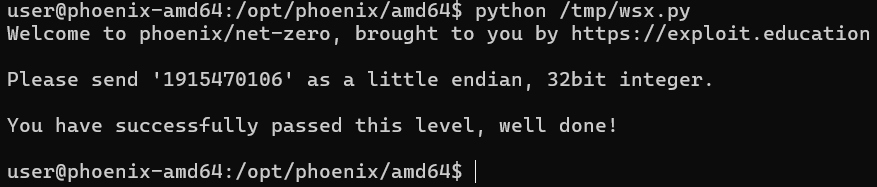
Result
Net-Two
Challenge: Phoenix/Net-Two
Goal: Correctly reconstruct and send back a computed unsigned long value based on binary data received from the server.
Starting the Challenge
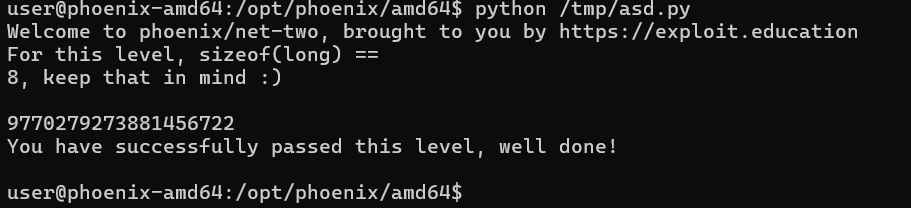
Run the binary:

The program immediately hints at an architecture-specific detail:
For this level, sizeof(long) == 8, keep that in mind :)
On amd64, sizeof(long) == 8, which is critical for understanding both the loop and the network protocol.
Source Code Analysis
unsigned long quad[sizeof(long)], result, wanted;
Since sizeof(long) == 8, this becomes:
unsigned long quad[8];
So:
quadcontains 8 elements- each element is an
unsigned long(8 bytes) - total random data size = 64 bytes
Random Generation
getrandom((void *)&quad, sizeof(quad), 0);
This fills all 8 unsigned long values with random data.
Server Output Logic
result = 0;
for (i = 0; i < sizeof(long); i++) {
  result += quad[i];
  write(1, (void *)&quad[i], sizeof(long));
}
Important observations:
- The loop runs 8 times
-
Each iteration:
- adds
quad[i]toresult - sends 8 raw bytes (
quad[i]) to the client
- adds
-
Total data sent:
- 8 × 8 = 64 bytes
Input Expectation
read(0, (void *)&wanted, sizeof(long));
- Server reads exactly 8 bytes
- Interprets them as an
unsigned long
So our task is:
Sum all received
unsigned longvalues and send the result back as a raw 8-byte value.
Strategy
- Connect to the service
- Read and ignore the banner
- Receive 8 chunks of 8 bytes
- Interpret each chunk as
uint64_t - Sum all values
- Apply 64-bit wraparound (unsigned overflow)
- Send the result as a little-endian unsigned long
Logic
import socket
import time
import struct


s = socket.socket(socket.AF_INET, socket.SOCK_STREAM)
s.connect(("127.0.0.1", 64002))

print(s.recv(512).decode())

time.sleep(0.3)

print(s.recv(24))

data = b''
i = 0
num_msg = 0
while i < 8:
        #print(len(data))
        data += s.recv(8)
        i = i+1

num_msg = struct.unpack('<8Q', data)

i = 0
result = 0
for v in num_msg:
    result = (result + v) & 0xFFFFFFFFFFFFFFFF

print(result)

#result = sum(num_msg)

s.sendall(struct.pack('<Q', result))

print(s.recv(400))
Result